-
zaph0d released this
2026-05-18 17:59:57 +02:00 | 3 commits to main since this release📅 Originally published on GitHub: Mon, 18 May 2026 16:00:31 GMT
🏷️ Git tag created: Mon, 18 May 2026 15:59:57 GMTWhat's new
macOS app — native UI overhaul
This release rewrites the macOS menu bar app UI to look and feel like a real macOS app instead of an Android app running on a Mac.
Removed
- 5-second splash screen with countdown — the app now starts silently in the menu bar with no visible window
macos_uidependency — its native plugins were injecting a yellow tint over the entire Flutter surface- All Material Design widgets (ripple effects,
FilledButton,Slider,TextFieldwith outline border,Scaffold) - Box shadows on category cards
Added / Changed
- Window starts hidden; popover only appears when you click the tray icon
CupertinoSlidingSegmentedControltab bar (pill style, correct macOS proportions)CupertinoTextFieldfor all text inputs (inset border, native macOS look)CupertinoSliderfor the weekly goal settingCupertinoButton.filledfor the connect button in setupCupertinoActivityIndicatorfor all loading spinnersCupertinoIconsthroughout — no more Material icons.AppleSystemUIFont(SF Pro) as the app font- Hardcoded macOS color tokens — UI colors are never influenced by the system accent color
- Pointer cursor on all interactive elements
- Hover states via
AnimatedOpacity(no ripple) - Fixed pre-existing compile error:
widgets/daily_log_dialog.dartwas missing
Full changelog: https://github.com/niels-emmer/time-keeper/compare/v1.3.0...v1.4.0
Downloads
-
Source code (ZIP)
0 downloads
-
Source code (TAR.GZ)
0 downloads
-
v1.3.0 Stable
2026-05-18 15:48:38 +02:00 | 4 commits to main since this release📅 Originally published on GitHub: Mon, 18 May 2026 13:48:55 GMT
🏷️ Git tag created: Mon, 18 May 2026 13:48:38 GMTTime Keeper v1.3.0
This minor release focuses on polishing the day-to-day tracking experience across the PWA and the macOS menu bar app. It adds better weekly repair/edit flows on macOS, moves category target management into Settings, and improves update and notification behavior on mobile.
Highlights
-
Category targets moved into Settings
- Category target configuration now lives in Settings instead of the previous location.
-
Better PWA update behavior
- The app now auto-checks for new PWA versions when it resumes, making updates easier to pick up without a manual refresh.
-
Improved Android timer notifications
- Fixed the Android timer notification badge icon so the status bar uses a proper monochrome badge asset instead of the previous white blob.
-
macOS weekly editing and repair flows
- Added weekly inline cell editing and day-log support in the macOS app.
- Improved the macOS popover layout and styling.
- Included follow-up fixes for weekly-tab collection/spread syntax issues.
Source commits
fix(macos): improve UI layout and styling for popover appfix(macos): correct spread operator syntax in weekly tabfix(macos): use else instead of if for spread operator in collection literalfeat: move category targets into settingsAuto-check PWA updates on resumeFix Android timer notification badge iconAdd macOS weekly editing and day-log support
Full Changelog: https://github.com/niels-emmer/time-keeper/compare/v1.2.0...v1.3.0
Downloads
-
Source code (ZIP)
0 downloads
-
Source code (TAR.GZ)
0 downloads
-
-
v1.2.0 - UI updates Stable
2026-05-16 14:55:38 +02:00 | 13 commits to main since this release📅 Originally published on GitHub: Sat, 16 May 2026 13:28:25 GMT
🏷️ Git tag created: Sat, 16 May 2026 12:55:38 GMTWhat's Changed
- Merge v2: UI/UX improvements, public repo setup, and icon branding by @niels-emmer in https://github.com/niels-emmer/time-keeper/pull/35
Full Changelog: https://github.com/niels-emmer/time-keeper/compare/v1.0.0...v1.2.0
Downloads
-
Source code (ZIP)
0 downloads
-
Source code (TAR.GZ)
0 downloads
-
2026-05-16 13:14:20 +02:00 | 23 commits to main since this release📅 Originally published on GitHub: Sat, 16 May 2026 11:14:35 GMT
🏷️ Git tag created: Sat, 16 May 2026 11:14:20 GMTWhat's fixed
This patch makes frontend icon updates deploy reliably by switching install-surface icons from stable filenames with query strings to emitted content-hashed filenames.
Included
- Browser favicon and install-surface icon links now point at fingerprinted asset filenames
- PWA manifest icons now use fingerprinted filenames
- Service worker notification icon now uses the same fingerprinted 192 px asset
- Workspace package versions bumped to 1.1.1
Why this matters
After a VPS deploy, browsers and installed PWAs are much less likely to keep showing old icons from immutable caches because the icon URLs now change when the icon bytes change.
Downloads
-
Source code (ZIP)
0 downloads
-
Source code (TAR.GZ)
0 downloads
-
v1.1.0 — Windows Clock icon Stable
2026-05-16 12:45:15 +02:00 | 24 commits to main since this release📅 Originally published on GitHub: Sat, 16 May 2026 10:45:33 GMT
🏷️ Git tag created: Sat, 16 May 2026 10:45:15 GMTWhat's new
New app icon
All icon surfaces updated to the Windows Clock App design:
- Browser favicon, PWA icons (192 × 192 and 512 × 512, standard + maskable)
- Apple touch icon, Safari pinned-tab SVG
- macOS dock / taskbar AppIcon.appiconset (16 → 1024 px)
- macOS menu-bar tray icons (template and grey variants)
Other
- CategoryGrid: pin button layout polish
Downloads
-
Source code (ZIP)
0 downloads
-
Source code (TAR.GZ)
0 downloads
-
Time Keeper 1.0 Stable
2026-05-07 09:44:39 +02:00 | 37 commits to main since this release📅 Originally published on GitHub: Thu, 07 May 2026 07:45:14 GMT
🏷️ Git tag created: Thu, 07 May 2026 07:44:39 GMTTime Keeper 1.0
The first stable release of Time Keeper — a self-hosted personal work-timer PWA.
What's in 1.0
- One-tap timer — tap a category to start, auto-stops the previous one
- Weekly overview — hours by category × day, inline editing, CSV export
- Monthly tab — per-category budgets, month-to-date progress, projected vs actual, billable breakdown
- Billable categories — flag categories for billable / non-billable reporting
- End-of-day rounding — configurable 30 or 60 min increment, capped at weekly goal
- Light / dark / system theme — per-device override in Settings
- PWA — installable on macOS and Android, update notifications, offline-ready
- macOS status bar app — native Flutter app; shows active timer color and elapsed time in the menu bar
- Multi-user — data fully isolated by Authentik email; no admin interface needed
- Self-hosted — Docker Compose, SQLite, no external services beyond Authentik
Tech stack
React 18 · Node.js 22 · Express · Drizzle ORM · SQLite · Tailwind CSS · shadcn/ui · Flutter
Setup
See README.md and the Wiki for full deployment instructions.
Built entirely by AI (Claude Code, GitHub Copilot, GPT-4), guided by iterative human prompting.
Downloads
-
Source code (ZIP)
0 downloads
-
Source code (TAR.GZ)
0 downloads
-
2026-04-12 08:05:22 +02:00 | 56 commits to main since this release📅 Originally published on GitHub: Sun, 12 Apr 2026 06:05:37 GMT
🏷️ Git tag created: Sun, 12 Apr 2026 06:05:22 GMTWhat's new
Editable weekly summary cells
The weekly overview table is now fully editable. Click any hour cell in a category row to edit the value inline — no more hunting through individual time entries to fix a mistake.
- Click to edit — any cell in a category row opens a numeric input pre-filled with the current hours
- Live totals — per-day and per-week totals update as you type, before saving
- Keyboard friendly — Enter to save, Escape to cancel
- Safe writes — the backend adjusts only the last time entry for the selected day/category, preserving earlier entries; entering 0 cleanly deletes all entries for that cell
- Navigation resets — moving to a different week clears any in-progress edits
New API endpoint
PATCH /api/summary/adjust-cell— sets the total minutes for a(date, categoryId)cell by creating, adjusting, or deleting the underlyingtime_entriesrows. Category ownership is validated before any modification.Docs updated
docs/memory/decisions.md— D-016 (inline cell editing)docs/memory/INDEX.md— new endpoint, updated WeeklySummary.tsx descriptionSECURITY.md— new threat model row for cross-user write protectionREADME.md— updated Weekly overview feature description
Screenshots
The weekly tab UI has changed visibly —
docs/screenshots/weekly.pngshould be regenerated (seedocs/memory/INDEX.mdfor steps).Downloads
-
Source code (ZIP)
0 downloads
-
Source code (TAR.GZ)
0 downloads
-
2026-04-07 07:15:43 +02:00 | 67 commits to main since this release📅 Originally published on GitHub: Tue, 07 Apr 2026 05:16:34 GMT
🏷️ Git tag created: Tue, 07 Apr 2026 05:15:43 GMTWhat's new
macOS status bar app
A native Flutter app that lives in your macOS menu bar. No browser required.
- Three-state tray icon: grey (not connected), monochrome (idle), category-colored dot (timer running)
- Tray title: shows `CODE hh:mm` next to the icon when a timer is active
- Right-click menu: start/stop timers without opening the popover
- Click to open a 380×560 popover panel with three tabs:
- Track — category grid, active timer card
- Weekly — hours by category × day, copy to clipboard
- Settings — weekly goal, rounding increment, disconnect
- Credentials stored in macOS Keychain
Personal access tokens (Bearer auth)
- Create tokens in Settings → Personal Access Tokens in the web app
- 256-bit random tokens; only the SHA-256 hash stored in DB
- Shown once on creation; revocable at any time
- Token management requires browser login — a token cannot create more tokens
New: `api.*` subdomain
Backend exposed on port 38522 for a direct NPM proxy host (no Authentik). See docs/integration/api-subdomain.md.
Deployment
```bash
APP_VERSION=v0.11.0 docker compose up -d --build
```Then set up the `api.*` subdomain per docs/integration/api-subdomain.md, create a token in Settings, and follow packages/macos_app/README.md to build the Flutter app.
Before building: generate the two tray icon PNGs described in `packages/macos_app/assets/tray/README.md`.
The Settings page now shows a Personal Access Tokens card — consider regenerating `docs/screenshots/settings.png`.
Downloads
-
Source code (ZIP)
0 downloads
-
Source code (TAR.GZ)
0 downloads
-
2026-02-21 15:59:32 +01:00 | 75 commits to main since this release📅 Originally published on GitHub: Sat, 21 Feb 2026 15:00:09 GMT
🏷️ Git tag created: Sat, 21 Feb 2026 14:59:32 GMTTip
Human here: re-connected my keyboard for a second to give a Big Fat Well Done to Claude on this one, being the first code agent to succesfully add a light theme this far in the development cycle (aka very late) on the basis of 1 inquiring, and 1 clarifying prompt. With zero mistakes, up to and including releasing the new feature here.
What's new
Adds full light and dark colour themes, with a System option (the new default) that follows your OS preference in real time.
Settings → Appearance
A new Light / System / Dark toggle sits between Work week and About in Settings. The choice is saved to
localStorageand takes effect instantly — no page reload.Technical highlights
- No flash on load — an inline
<head>script applies the correct.darkclass before the first paint, so there's never a visible flicker - Live OS sync — selecting System registers a
prefers-color-schememedia-query listener; switching your phone or Mac between light and dark updates the app immediately without touching Settings - CSS variable split —
:rootis now the light palette;.darkholds the original dark palette; every existingbg-background,text-muted-foreground, etc. adapts automatically - Browser chrome aware — two
<meta name="theme-color">tags withmediaattributes keep the address bar colour in sync with the active scheme - 18 new unit tests covering all theme utility functions (
getStoredTheme,setStoredTheme,applyTheme,resolveTheme,getSystemTheme)
Files changed
File Change src/index.css:root→ light palette;.dark→ original dark palettesrc/lib/theme.tsNew — pure theme utilities src/context/ThemeContext.tsxNew — ThemeProvider+useThemehooksrc/components/ThemeSetting.tsxNew — Settings UI component src/lib/__tests__/theme.test.tsNew — 18 unit tests index.htmlAnti-flash inline script; dual theme-colormeta tagsvitest.config.tsNew — vitest config (jsdom) package.json0.9.0 → 0.10.0; addedvitest+jsdomdevDepsScreenshots (
docs/screenshots/settings.png) may need regenerating to show the new Appearance card.Downloads
-
Source code (ZIP)
0 downloads
-
Source code (TAR.GZ)
0 downloads
- No flash on load — an inline
-
2026-02-21 13:53:18 +01:00 | 76 commits to main since this release📅 Originally published on GitHub: Sat, 21 Feb 2026 12:53:41 GMT
🏷️ Git tag created: Sat, 21 Feb 2026 12:53:18 GMTWhat's new
Category cards — pill badge design
- Replaced the left colour stripe with a compact pill badge in the top-left corner of each card
- Badge shows the Workday code when set, otherwise auto-generates 2-character initials (first letter of each word for multi-word names; first 2 letters for single-word names)
- Active card now has a thicker coloured border, a tinted background, and a glow shadow so the running category is immediately obvious
- Pulsing dot retained in the top-right corner of the active card
Weekly tab — stacked bar chart
- New colour-coded stacked bar above the summary table showing each category's share of the week's total hours
- Segments are sorted largest-first; hovering shows the category name and hours
- Compact legend below the bar lists every category with its colour dot and hour total
Weekly tab — button overhaul
- "Copy for Workday" → "Export this week": downloads a
.csvfile (Category, Workday Code, Mon–Sun dates, Total; decimal hours to 2 dp) instead of copying to clipboard - "Round today" → "Round week": rounds all 7 days of the displayed week in one click, respecting the weekly goal cap cumulatively and skipping already-rounded entries (idempotent)
New backend endpoint
POST /api/summary/round-week— applies end-of-day rounding to every day in an ISO week
Screenshots
Track Weekly Settings 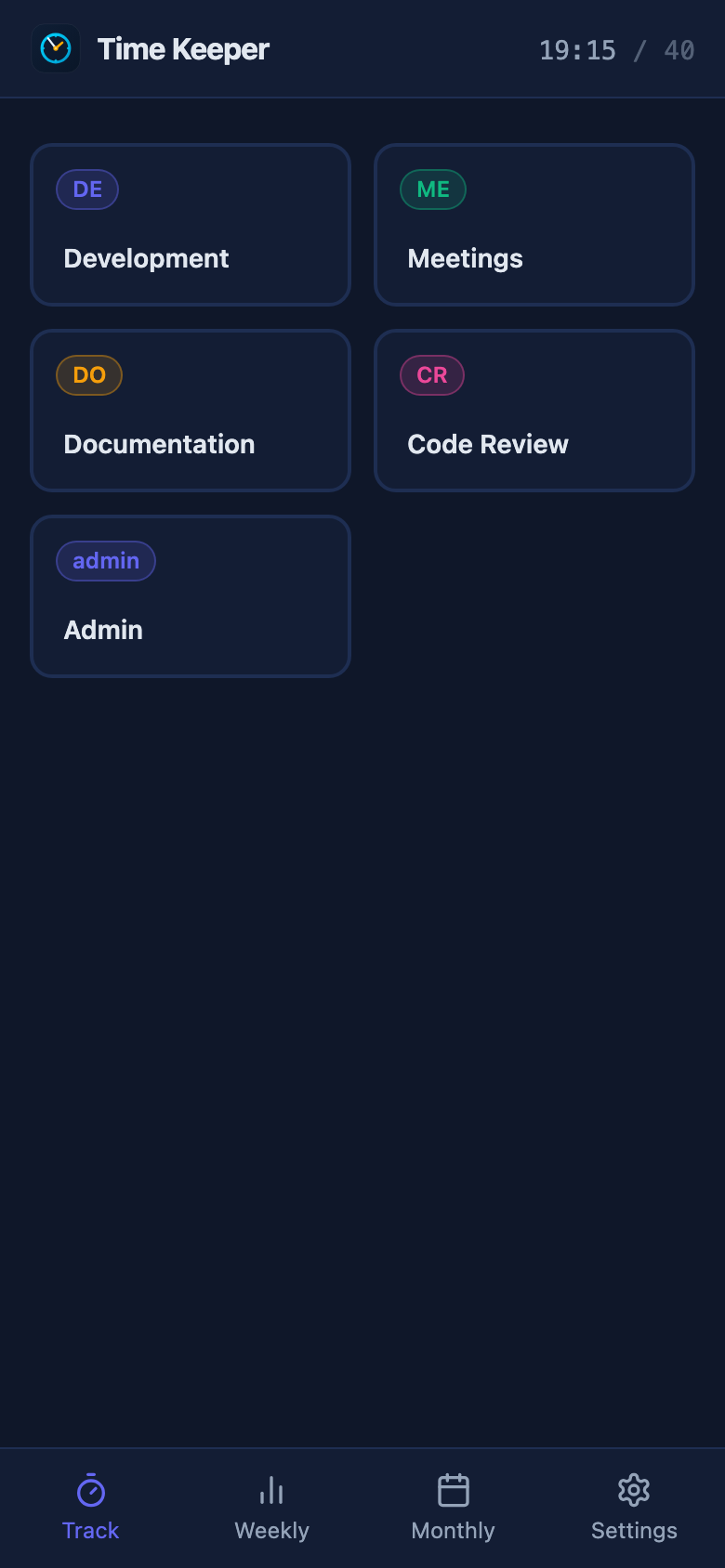
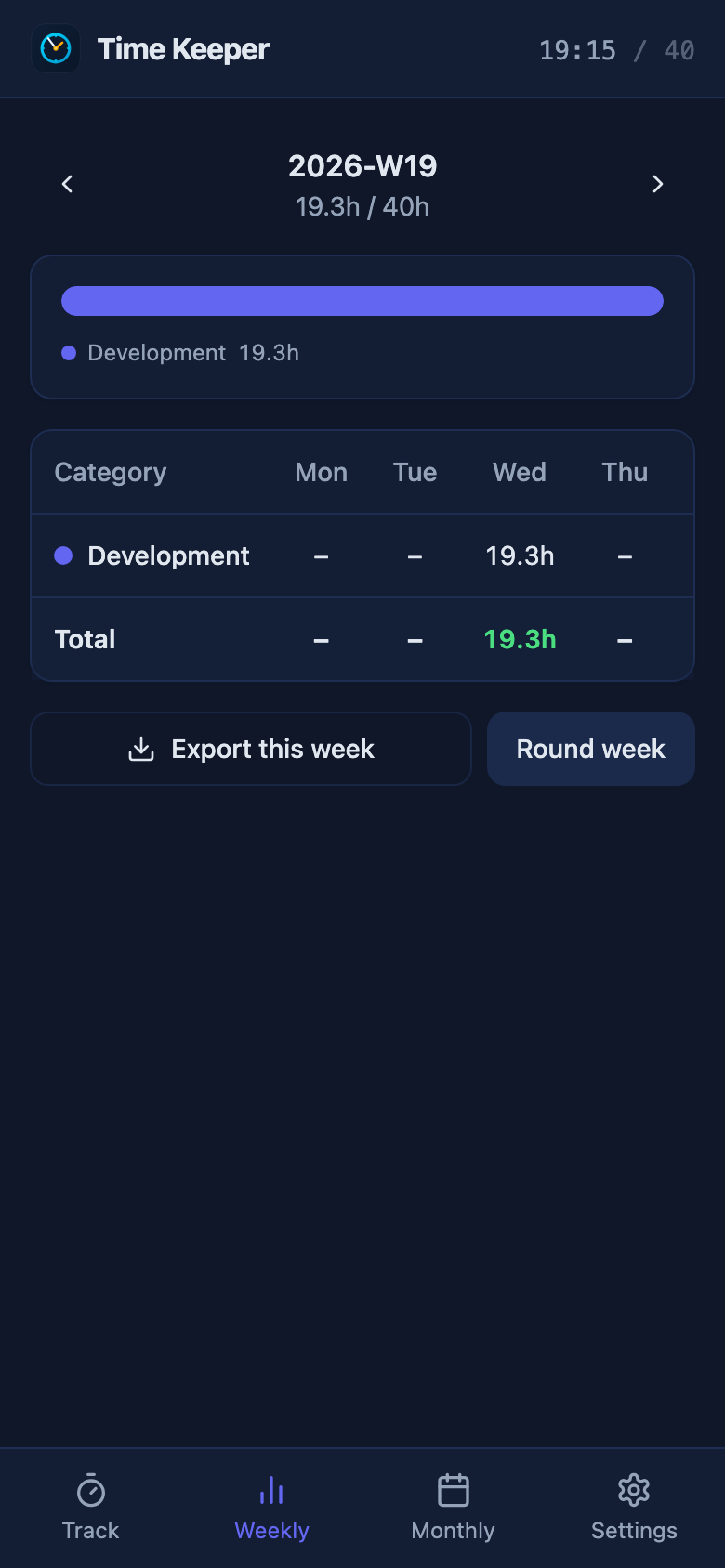
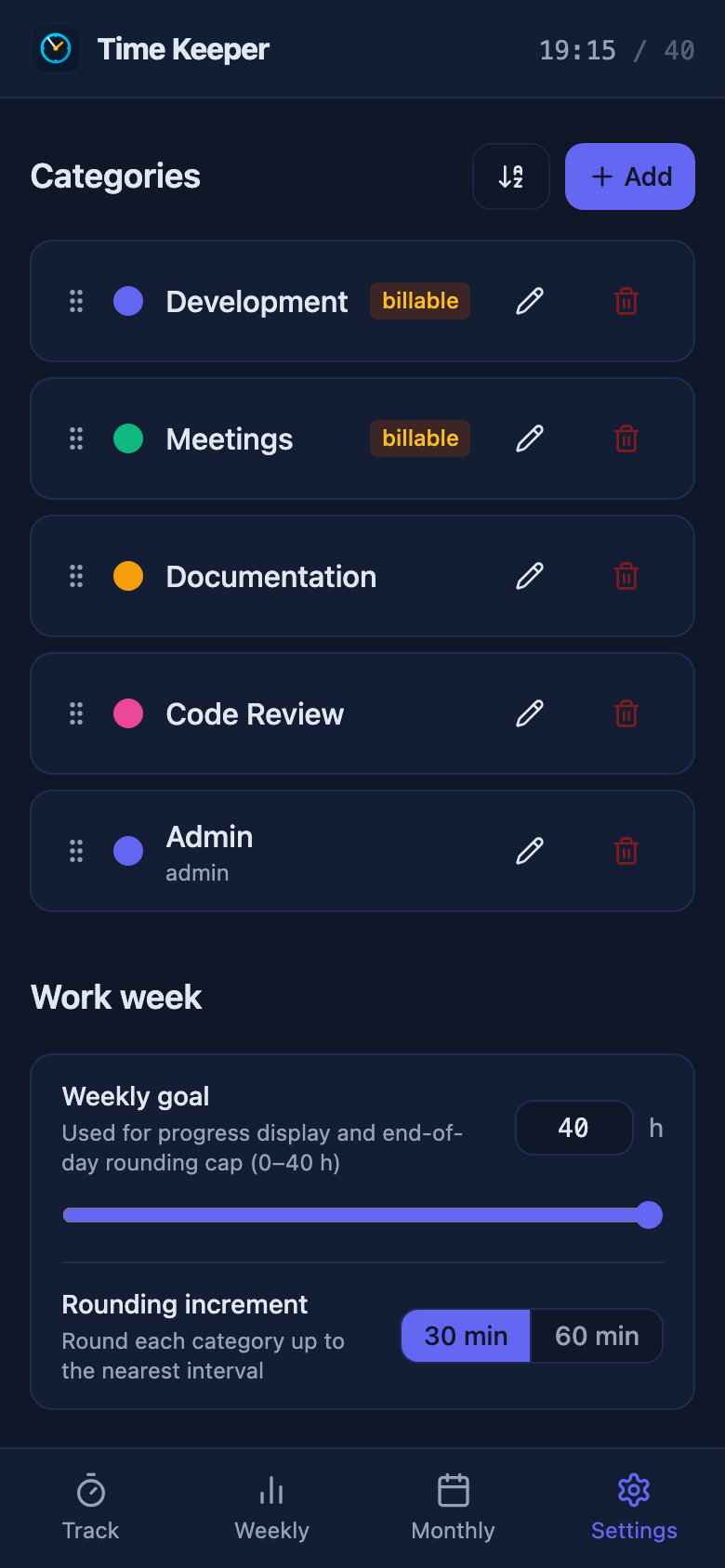
Downloads
-
Source code (ZIP)
0 downloads
-
Source code (TAR.GZ)
0 downloads
mirror of
https://github.com/niels-emmer/time-keeper.git
synced 2026-09-13 23:53:35 +02:00